How consent works
Last updated 3 September 2026
This page sets out the entire opt-in workflow, including the exact wording shown on the sign-up form and the exact text of every message the service can send. Nothing here is a summary: these are the strings themselves.
Programme at a glance
Programme name: Doses medication reminders
Message types: transactional only — medication reminders, refill reminders, missed-dose alerts to a nominated caregiver, and replies to inbound messages. No marketing or promotional messages are sent, ever.
Frequency: depends on the person's own dose schedule. Typically 1–4 messages a day, plus occasional refill and missed-dose messages.
Cost: message and data rates may apply.
Stop and help: reply STOP to end all messages, HELP for help.
Step 1 — Choosing whether texts are involved at all
The first thing the sign-up form at doses.care asks is how the service should work. Text messaging is one of two options, and the other one sends nothing to anybody. Consent to receive messages is not a condition of using Doses.
Shown on the sign-up form
How should this work?
Both ways work. Text reminders are optional
— the schedule and the dose log work perfectly well without them, and you do
not have to agree to any texts to use Doses.
We text at each dose time and they reply TAKEN or SKIP. They'll be asked to confirm by text before anything starts.
Nobody is texted, ever. You get the schedule and the log in the app and tick doses off yourself.
If the no-texts option is chosen, the form does not ask for the patient's mobile number at all, no number is stored, and the workflow below never begins.
Step 2 — The written opt-in on the form
If text reminders are chosen, two separate, unticked checkboxes appear — one for the person taking the medication and one for the caregiver’s own number, because each person consents for their own phone. Each is its own control: neither is combined with acceptance of the Terms of Service or the Privacy Policy, which are separate checkboxes again, and neither is pre-selected.
The wording depends on who is filling the form in, because the two situations are different in law and we treat them differently.
When someone signs up for themselves
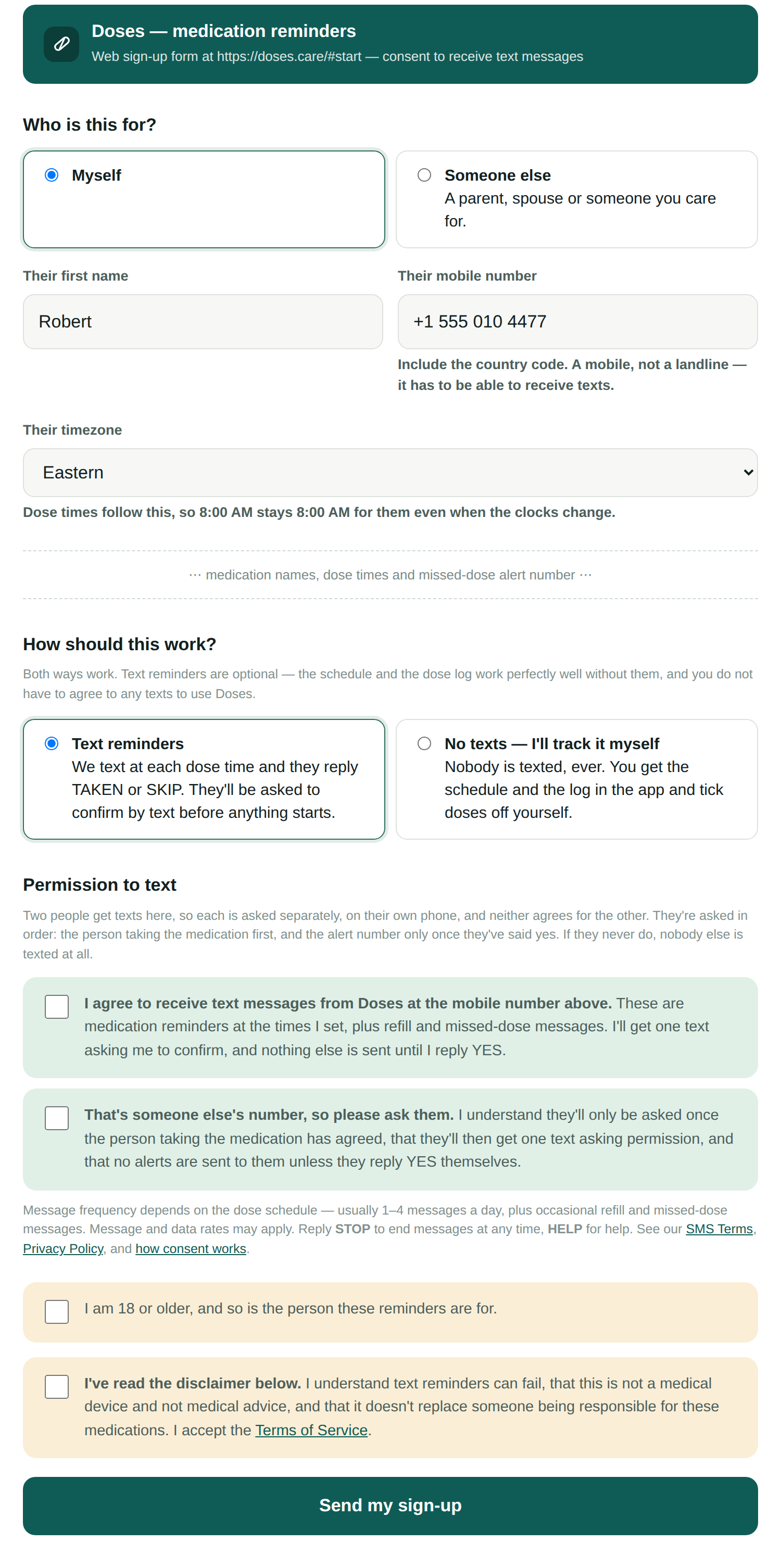
Exact wording — unticked by default
Message frequency depends on the dose schedule — usually 1–4 messages a day, plus occasional refill and missed-dose messages. Message and data rates may apply. Reply STOP to end messages at any time, HELP for help. See our SMS Terms, Privacy Policy, and how consent works.
When someone signs up on another person's behalf
A family member cannot give consent for someone else, and we do not ask them to. What they authorise is one single message: the request for that person's permission. Nothing else follows unless that person agrees themselves.
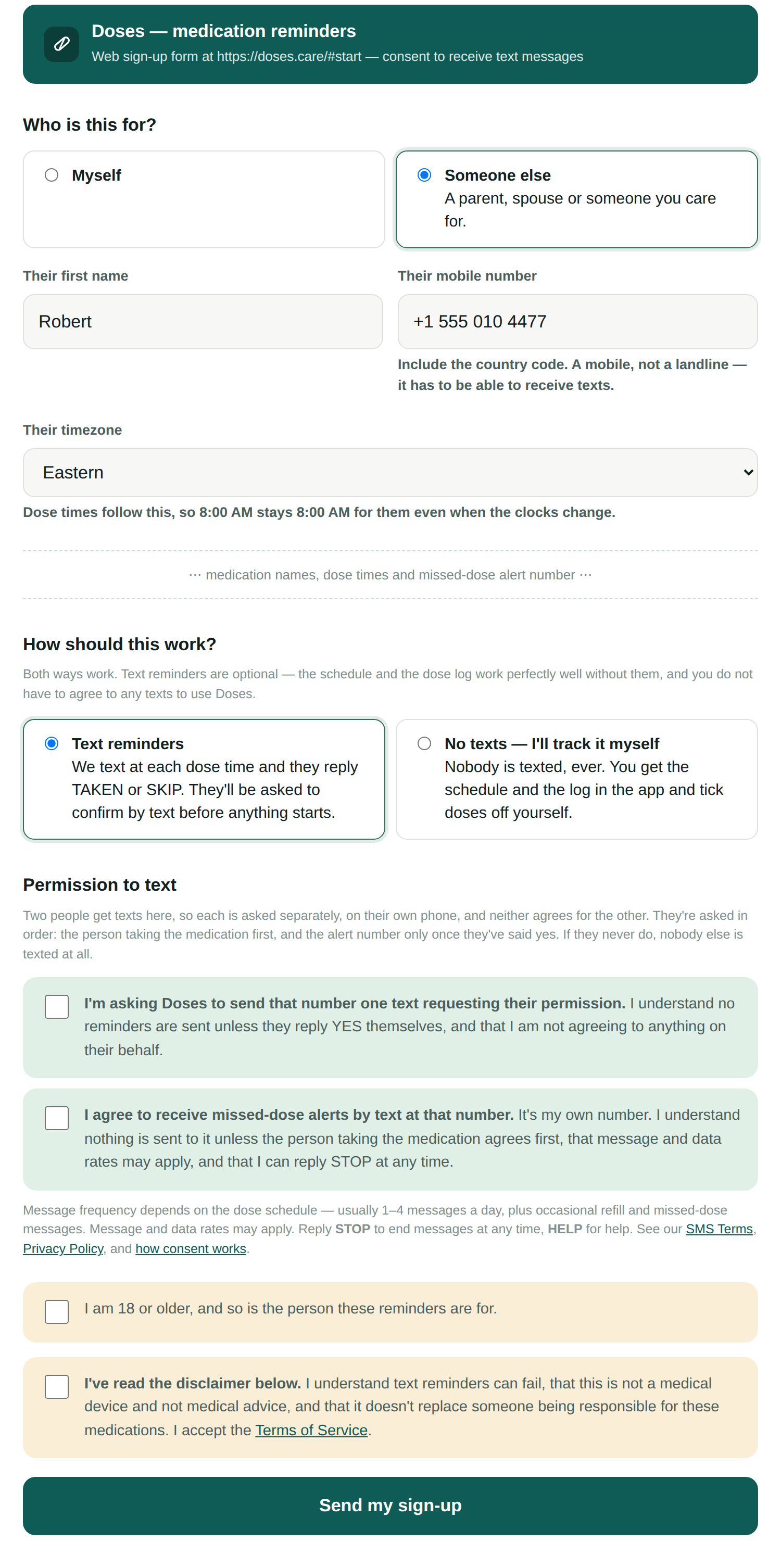
Exact wording — unticked by default
Message frequency depends on the dose schedule — usually 1–4 messages a day, plus occasional refill and missed-dose messages. Message and data rates may apply. Reply STOP to end messages at any time, HELP for help. See our SMS Terms, Privacy Policy, and how consent works.
The caregiver agrees separately, for their own number
Missed-dose alerts go to a second person, so that person is a recipient in their own right and needs their own consent. Being nominated by the patient is not consent, and the patient cannot give it for them. The form asks for it as its own checkbox, worded according to whose phone the alert number actually is.
When it is the signer's own number — unticked by default
When it is someone else's number — unticked by default
The form as the customer sees it
The same wording, in place on the live sign-up form at doses.care/#start, with text reminders selected. Only the medication and schedule fields are left out, where marked; nothing else is altered.
Step 3 — A person reviews every sign-up
Submitting the form does not send anything. It records a pending request. No patient record is created and no message leaves the system until a member of staff has read the submission and approved it. This is deliberate: a public form that texts whatever number is typed into it is a spam vector, so ours cannot do that.
Step 4 — The patient opts in, from their own phone
After approval, exactly one number is messaged: the patient's. This is the first message that number has ever received from us, and it is a request for permission. The caregiver is not texted at this point, and if the patient never agrees, the caregiver is never texted at all.
A family member may of course sit with them and help them read it and reply — often that is exactly what an older person needs. Helping is not the same as answering: the YES that starts reminders has to arrive from the patient's own number, and the system will not accept it from anywhere else.
If they reply YES, their consent is recorded together with the date and time, and reminders begin at the next scheduled dose:
If they do not reply, nothing else is ever sent — to them or to anyone else. There is no follow-up, no reminder to opt in, and no second attempt. Silence is not consent, and the system treats it that way: reminders are gated on a recorded YES in the database, not on the form submission.
Step 5 — Only then is the caregiver asked
The patient's YES is what triggers the caregiver's request. It goes to the caregiver's own phone, and it is the first message that number has ever received from us:
Until that caregiver replies YES from that phone, no alert is ever sent to them. A dose that goes unanswered in the meantime is recorded as unanswered rather than as alerted, because no alert went out. Their consent is separate from the patient's, stored separately, and stopped separately: a caregiver replying STOP silences their own alerts and changes nothing about the patient's reminders.
Step 6 — What they receive afterwards
Only these messages, and only after a recorded YES.
A missed-dose alert goes to the caregiver, once that caregiver has replied YES from their own phone. It never goes to anyone the patient has not named:
No message we send contains a diagnosis, a condition, a symptom, or any medical advice. We never tell anyone to take, skip, or double a dose. If someone replies with something we do not recognise, we do not guess at what they meant — the message is passed to a person and answered with a fixed line directing them to their pharmacist or prescriber.
Step 7 — Stopping
Replying STOP ends everything immediately, from any message, at any time. It is checked before anything else we do with an inbound message, so it works even if the rest of the reply makes no sense to us.
Replying HELP returns:
What we keep as the record of consent
For every recipient — patient and caregiver alike — we store the exact wording of the checkbox that was ticked at sign-up, whether it was ticked by that person or by someone acting for them, the date and time that person's own YES arrived, and the full text of every message sent and received in either direction. The two consents are stored separately and stop separately: a caregiver replying STOP silences their own alerts and changes nothing about the patient's reminders. That log is append-only: it cannot be edited or deleted through the application by anyone, including us.
We do not sell, rent, or share phone numbers, and we never share them with any third party for their own marketing. See the Privacy Policy.